


Repairing your mobile phone is essential to maintaining its functionality. Phones may develop faults like cracked screens, dead batteries, or malfunctioning charging ports with time. These issues may cause your phone to operate poorly and become difficult to use. Prompt repairs prolong the phone’s lifespan, stop additional damage, and help it function again. Long-term cost savings can be achieved by taking care of these issues as soon as possible, whether they are straightforward fixes like changing a screen or more complex ones like software difficulties. Frequent upkeep and expert repairs guarantee that your phone will continue to function as you need it to without needless disruptions.
Repairing a phone is crucial to getting it working again and prolonging its life. Frequent upkeep and timely repairs ensure the phone runs effectively by preventing more damage and problems from getting worse. For example, if left untreated, a broken screen might cause more serious interior damage in addition to impairing usability. Device performance can be negatively impacted and inconvenienced by battery issues, such as quick draining or failure to charge. The phone won’t turn on due to charging problems, whether they are port or adapter-related. By taking care of these typical issues early on, you may prolong the life of your phone and avoid expensive replacements.
Why Timely Mobile Phone Repairs Matter
Prevent Additional Damage
Ignoring a phone problem, such as a cracked screen, might eventually result in more serious issues. For instance, a tiny crack may enlarge and impair the performance of internal parts like the touch sensor or the display. Early problem solving keeps minor problems from growing into expensive fixes or irreversible damage.
Preserve Device Performance
Effective hardware and software are essential for phones to function properly. Your phone may be slow and annoying to use due to problems like slow charging, overheating, or software bugs. Without sacrificing the user experience, prompt fixes restore your phone’s functionality and responsiveness for daily tasks.
Prevent a Bad User Experience
If repairs are neglected, usability may suffer. For example, a malfunctioning battery may cause your phone to shut down without warning, and a cracked screen may make it challenging to use your smartphone. Your routine may be disturbed by these issues, which may impair your ability to communicate, use necessary apps, or even access crucial information.
Cost Savings
Postponing repairs may appear to be a cost-effective strategy at first, but it frequently results in increased expenses later on. For example, if a simple battery replacement is neglected for too long, it may become a more costly repair that calls for a new motherboard or other internal components. Minor, fixable problems can turn into more serious repairs or even a complete gadget replacement, which will cost a lot more than fixing the issue at an early stage.
Extended Device Lifespan
Frequent repairs help keep your phone in good condition overall in addition to fixing any current problems. You can extend the life of your phone by making sure that components like the screen, battery, and charging port are in good shape. Your equipment will require fewer replacements if its lifespan is extended, which is economical and good for the environment.
Common Mobile Phone Issues and How to Diagnose Them
Broken or Broken Screen
- Signs include sections of the touch screen that are not responsive, visible cracks, broken glass, or a distorted display.
- Causes include manufacturing flaws, pressure from sitting or laying heavy objects on the phone, and dropping the phone.
- Easy Solutions: To prevent additional harm, use a screen protector and think about getting a professional repair service to replace the screen. Adhesive screen repair kits may provide short-term assistance for small cracks.
Problems with the Battery
- Warning signs include a rapidly depleting battery, an unexpected phone shutdown, or lengthy charging times.
- Causes include excessive use, an old battery, bright screens, background apps, or improper charging practices.
- Diagnosis: To determine which apps use the most power, check battery use in settings. It might be time for a replacement if the battery life is noticeably less than typical.
- Easy Solutions: To temporarily increase battery life, turn off unused background apps, reduce screen brightness, or activate power-saving modes.
Charging Problems
- Warning signs include the phone not charging when plugged in, delayed charging, or a wriggling, unplugged charging cable.
- Causes include a dirty or broken charging port, a malfunctioning charging cable or adapter, or software bugs that alter how the device charges.
- Diagnosis: Check for damage or debris in the charging port. To rule out those parts, try a new cable or adapter. If the issue continues, there might be a hardware problem with the phone.
- Easy Solutions: To determine whether the problem is with the phone or the cable, try using a different charger and gently clean the charging port using compressed air or a little brush.
Software Glitches
- Warning signs include unplanned app crashes, frozen screens, sluggish performance, or unresponsive touch motions.
- Causes include faulty files, outdated software, an excessive number of background apps, or an overburdened system memory.
- Diagnosis: Try restarting the device, cleaning up the cache, or looking for any pending software updates. A factory reset could help fix more serious software issues if the situation continues.
- Easy Solutions: Restarting the phone, updating the software, or removing troublesome apps are all options. After backing up your data, think about doing a factory reset if the issue persists.
Step-by-Step Guide for Basic Mobile Phone Repairs
Evaluating the Damage
Start by determining whether your phone has a damaged screen, a dead battery, or a charging issue. Check for software issues (such as freezing or app crashes) and physical damage (such as cracks or dents). To identify the issue, try simple troubleshooting techniques like rebooting the device or experimenting with alternative charging cords.
Make a Backup of Your Data
Make a backup of your key files (contacts, images, and messages) to a computer or cloud services like Google Drive or iCloud before starting any repairs. To prevent losing important data, this step is vital, particularly if you’re changing internal components or doing a factory reset.
Selecting the Appropriate Repair Service
To be sure you’re receiving a good deal, investigate and contrast repair prices offered by several suppliers. Verify the service’s standing and level of experience, particularly if you have a particular phone model. Check for reviews and get suggestions. For further piece of mind, make sure the service provides warranties on repairs.
Professional Services vs Do-it-yourself Repairs
With the correct equipment and instructions, simple fixes like changing a screen protector or cleaning the charging port can frequently be completed by yourself. However, it’s safer to have professional assistance for more complicated repairs like changing the screen, battery, or repairing water damage. DIY projects involving fragile parts may result in further harm or nullify warranties.
How to Avoid Future Mobile Phone Damage
Protecting the Phone from Physical Damage
Use Screen Protectors: Applying screen protectors can help shield your screen from scratches and breaks caused by drops and impacts. Protectors for tempered glass provide an extra degree of resilience.
Purchase a High-Quality Case: A robust phone case, such as one that is shockproof or tough, offers defense against knocks, falls, and normal wear and tear. For added protection, look for a case with reinforced corners.
Steer Clear of Dangerous Situations: Avoid placing your phone in extremely hot or cold environments as they might harm internal parts and shorten battery life over time.
Appropriate Storage: To prevent scratching or damage, keep your phone out of reach of sharp objects by keeping it in a secure location, like a pocket or pouch, when not in use.
Frequent Maintenance Procedures
Software Updates: Install the most recent updates to keep your phone’s software current. This addresses bugs that might cause performance problems and improves system security and stability.
Battery maintenance: Do not constantly let your battery charge to 100% or drain to 0%. You may extend the life of your battery by keeping it between 20% and 80%.
Frequent Cleaning: To avoid causing long-term harm or impeding operation, clean your phone on a regular basis, paying particular attention to the charging port, speaker, and camera lens.
Appropriate Charging Practices
Employ Certified Chargers: To avoid damaging your phone’s battery or charging port, only use the charger and cable that the manufacturer has approved.
Avoid Overcharging: To prevent extended exposure to high voltage, which over time can shorten battery life, unplug your phone as soon as it reaches 100%.
Charge Frequently: For long-term battery health, try to charge your phone when the battery hits 20% to 30% rather than letting it fall to 0%.
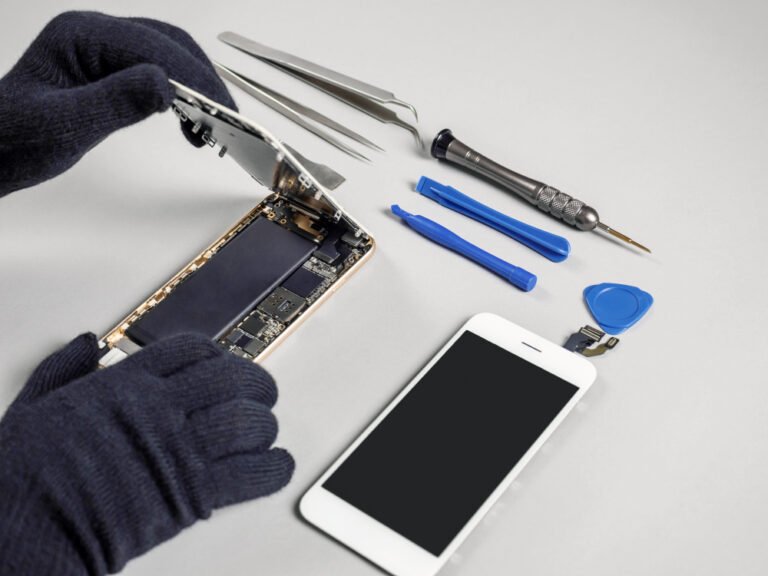
Choosing a Reliable Mobile Phone Repair Service
Credibility and Background
Seek out a repair company that has established a solid reputation over time. Pick a repair shop that has a lot of experience fixing phones, specifically the model and make you own. Reliable repairs are probably offered by a company that has been in operation for a number of years.
Client Testimonials
Always read internet reviews on sites like Facebook, Yelp, and Google. While bad reviews may indicate possible problems, positive evaluations are an excellent indicator of dependable service. To locate reliable repair providers, contact friends or family for referrals.
Certification and Proficiency
Select a repair shop that employs qualified specialists that are skilled in fixing the particular brand of your phone. By adhering to industry standards, certified technicians make sure your phone is fixed with the right techniques and premium components.
Time Spent Turnaround
If you depend on your phone on a regular basis, make sure the repair business can finish the job in a fair amount of time. While some businesses will give an estimated repair time, others might offer same-day repairs.
Guarantee and Warranty
Choose services that provide repair warranties or guarantees. A warranty gives you additional piece of mind by guaranteeing that they will address any issues that arise after the repair without charging you more.
Why Choose Expert Repair Services?
Using the proper equipment and high-quality parts, professional repair services guarantee that your phone is handled carefully. By carefully diagnosing and resolving problems, technicians reduce the possibility of more harm and prolong the life of your phone.
Also Read: What to Check Before Selling Your Phone?
Frequently Asked Questions
What Are the Most Common Phone Issues That Require Repair?
Common phone issues like cracked screens, dead batteries, charging problems, and software glitches often require immediate attention. A cracked screen affects touch and visibility, while a failing battery can cause sudden shutdowns or rapid power loss. Charging troubles, usually from damaged ports or faulty cables, prevent the phone from powering up properly. Software glitches, such as lag or app crashes, disrupt the user experience. Timely repairs are crucial to avoid further damage or expensive replacements. For professional assistance, reach out to iPhone Repair Brisbane—our expert technicians are here to help.
Can I Repair My Phone Myself?
If you have the necessary equipment and know-how, you can fix small problems with your phone on your own, such as changing the screen protector, cleaning the charging port, or changing the battery. However, it’s preferable to have professional assistance for more complicated repairs, such replacing internal parts, repairing a damaged screen, or repairing water damage. Do-it-yourself repairs can be dangerous since incorrect handling might void warranties or cause additional harm. It is safer and more efficient to rely on a qualified technician or repair service if you are unclear about the repair procedure.
Are Phone Repairs Expensive?
The cost of phone repairs can vary based on the model and the problem. Smaller fixes, such as changing the screen protector or the battery, are usually reasonably priced. More complicated problems, including a broken screen, a malfunctioning motherboard, or water damage, can be expensive, particularly for expensive models. Although hiring a professional repair service may cost more than doing it yourself, it guarantees quality and safety. It’s critical to evaluate the advantages of expert service against the possible risks of do-it-yourself repairs and compare repair prices from various suppliers.