

For daily use, a mobile phone’s screen and display must be functional. You may use the screen to browse, send messages, make calls, and use apps on your phone. You can view photographs, watch videos, and read text without any problems if the display is clear. It may be difficult or even unsafe to use your phone if the screen is cracked, unresponsive, or blurry. Over time, other components of the phone may also be impacted by a damaged screen. Maintaining the screen’s quality improves your phone’s general usability and guarantees seamless operation.
Cracks, sluggish touch, and display glitches are common screen problems. The most prevalent issue is cracks, which are frequently brought about by unintentional drops or impacts and make using the phone challenging. The user experience may be negatively impacted by unresponsive touch, which occurs when the screen ceases to register taps or swipes. Liquid damage or internal hardware problems can cause display defects including flickering, discolouration, or lines on the screen. Because it restores the phone’s functionality, replacing the screen is a workable remedy for these issues. A refreshed screen prolongs the device’s life and boosts performance by guaranteeing clear visibility, precise touch response, and a seamless user experience.
Common Reasons for Screen and Display Damage
Unintentional Drops and Cracks
Unintentional drops are among the most frequent reasons for screen damage. Significant harm can result from even a slight drop from a low altitude, particularly if the screen strikes a hard surface like tile or concrete. Cracks from the impact frequently spread over the screen, making it challenging to operate the gadget correctly. Sometimes the cracks don’t interfere with operation right away, but they can get worse over time and eventually cause the screen to fail entirely. The likelihood of such harm is increased when you use your phone without a protective case.
Water or Liquid Damage
Another common reason for problems with screens and displays is water or liquid damage. Liquids can harm internal parts of the gadget when they leak in, which can impair the display’s clarity and touch capability. For instance, a phone’s touch screen may become unresponsive after being submerged in water, failing to recognise inputs. Furthermore, moisture beneath the glass may result in watermarks or irreversible discoloration on the screen. Even tiny liquid spills can gradually damage the screen, especially if they are not cleaned up right once.
Wear and Tear
Constant use of your mobile device over time may cause the screen to gradually deteriorate. The surface may become scratched by coins, keys, or other sharp items, which could interfere with touch sensitivity and reduce display clarity. Long-term exposure to high temperatures can also degrade the quality of the screen, particularly if the phone is left in full sunlight. The screen may experience difficulties such as pixel burning, discolouration, or touch responsiveness as the device ages. These impacts can be reduced with proper handling and routine maintenance.
Hardware Malfunctions
Rather than exterior damage, internal hardware failures might occasionally be the cause of screen and display problems. For instance, a phone may have dead pixels, which are little regions of the screen that are colorless. Another prevalent hardware problem is flickering, in which the screen alternates between flashing and changing brightness without the user’s input. These issues may arise as a result of manufacturing flaws or prolonged use, in which case the display’s internal parts begin to malfunction. The best way to get regular functioning back in many cases is to replace the screen.
Signs that Indicate the Need for Replacement
Functionality Affected by Cracks
If there are obvious cracks in your phone’s screen, it’s obvious that it could need to be replaced. In addition to detracting from your phone’s appearance, cracks may also impair its operation. They may cause your phone to become unresponsive or make it more difficult to use the touch screen. The screen may eventually fail entirely if the cracks get worse.
Unresponsive Touchscreen
It’s a serious problem when a touchscreen doesn’t react correctly to gestures, swipes, or taps. A more serious issue with the display’s operation is indicated if the screen of your phone occasionally stops responding or becomes unresponsive in specific places. The digitizer, the part in charge of touch input, may have internal damage as a result. The best course of action in this situation is to replace the screen.
Visual Distortion or Blurriness
If you see that your phone’s screen is pixelated, blurry, or displays distorted colors, it may indicate that the screen or display is broken. Long-term wear and tear, internal hardware problems, or liquid exposure can all cause this. In addition to making using your phone challenging, these graphic bugs detract from the overall user experience. Your phone’s clarity and functionality will be restored if the problem continues after you replace the screen.
Risks of Delaying Replacement
Additional Damage
If you put off replacing your screen, it may get worse. For instance, a tiny break may enlarge and impact not only the screen but also your phone’s internal parts. It could become more difficult to operate your phone for even simple tasks if your touchscreen becomes unresponsive. Long-term damage may eventually necessitate a complete gadget replacement or more expensive repairs.
Safety Issues
There may be safety issues associated with a damaged screen. When using the phone, cracked glass might cut your fingertips, causing minor but uncomfortable injuries. Internal corrosion could result from liquid damage, which could lead to electrical problems or perhaps short circuiting. Addressing the damage as soon as possible is crucial in these situations to prevent any health or safety risks linked to additional deterioration.
Types of Screen Replacements
Glass Only Replacement
This kind of replacement is best for small scratches or cracks where the touch and display functions are still functional. Since it merely replaces the outer glass layer and leaves the underlying screen and touch components intact, it is the most economical choice.
Complete Display Replacement
A complete display replacement is required for more serious damage, such as when the screen is completely blacked out or the touch operation is impaired. By replacing the internal display as well as the glass, this replacement essentially returns your phone to its original state.
OEM vs Third-Party Screen Replacements
OEM Replacement: To guarantee a flawless fit and superior quality, Original Equipment Manufacturer (OEM) parts are purchased directly from the device’s manufacturer. OEM components are more costly, but they offer the highest performance and longevity, preserving the warranty and value of your phone.
Third-Party Replacement: Third-party screens are often made by independent manufacturers and are less expensive. Although they might be less expensive, they might not be as good as the original and might interfere with your phone’s functionality. Additionally, you might have to deal with compatibility problems or have your warranty voided.
Steps in the Screen Replacement Process
Diagnostic Checks to Verify Screen Issues
To determine the extent of the damage, a comprehensive diagnostic procedure is the first step. Technicians will closely inspect for display malfunctions, dead pixels, cracks, and problems with touch responsiveness. In order to rule out internal hardware issues, such motherboard damage, that might be the source of the symptoms, they will also make sure the problem is only screen-related.
Removing the Damaged Screen
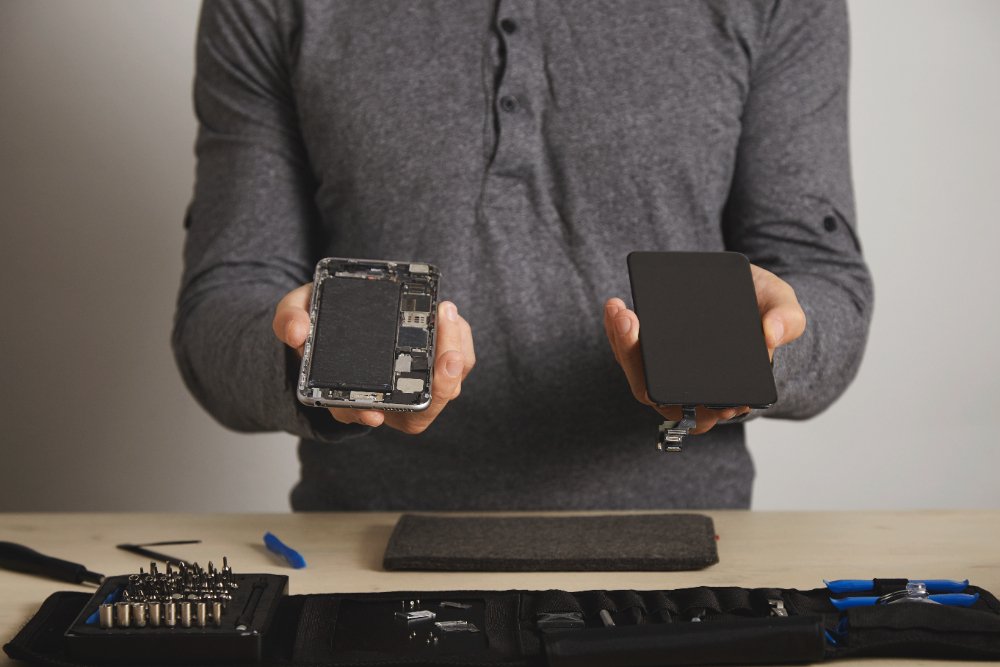
As soon as the damage has been verified, the damaged screen is gently taken out. To remove the screen from the phone’s body without harming internal parts like the battery or camera, exact methods and specialised equipment are needed. Heating the glue to soften it before removing it may be necessary, depending on the phone.
Installing a New Screen
When a replacement screen is installed, it is carefully positioned and lined up with the internal connectors of the phone. By ensuring that all the parts, including touch sensors and display connectors, are precisely aligned, technicians make sure the screen is firmly fixed. After that, the new screen’s seamless interaction with the phone’s operating system is evaluated.
Testing the Phone After Replacement
The phone is put through a rigorous testing process after installation. This involves examining the touch screen’s color accuracy, display clarity, and responsiveness. The phone’s functionality is examined to make sure there are no problems and that it functions as smoothly as it did before to the screen damage.
Cost of Mobile Screen and Display Replacement
Factors Influencing Price
Phone Model: Because of their sophisticated technology and sharp screens, high-end gadgets like Samsung Galaxy models and iPhones cost more to fix.
Type of Replacement: Full display replacements, which include touch and LCD panels, are more expensive than glass-only repairs (for small cracks).
Service Provider: Authorised repair shops in Australia might bill more, but they promise to use genuine parts. Although they might use non-OEM parts, third-party suppliers frequently give less expensive solutions.
Average Prices for Well-Known Australian Phone Brands
iPhone: Depending on the model (e.g., iPhone 11 to iPhone 14 Pro Max), replacing the screen can cost anywhere between AUD 250 and AUD 600.
Samsung: Models such as the Galaxy S series range in price from AUD 200 to AUD 500.
Vivo: Depending on the phone model, screen repairs are more reasonably priced, typically costing between AUD 100 and AUD 300.
Cost-effective Advice
Warranty and Insurance: To lower repair expenses, find out if your phone is still covered by warranty or if you have device insurance.
Examine and Contrast Repair Services: To discover the best deal on high-quality service, get quotations from many repair shops.
Examine Repairs by Third Parties: Reputable outside companies in Australia can provide reasonably priced repairs, but make sure they employ high-quality components.
Preventive Actions: To prevent damage and lessen the need for regular repairs, use screen protectors and sturdy cases.
Choosing a Reliable Repair Service
How to Locate a Reputable Repair Company
- Investigate local repair businesses by reading evaluations and examining ratings on websites like Google or social media.
- Seek out repair facilities with qualified specialists who have dealt with your particular phone model before.
- To guarantee longevity, pick suppliers who replace screens using OEM or premium parts.
Questions to Consider Prior to Choosing a Repair Service
- Which kind of replacement parts—OEM or third-party—do you use?
- Do you provide same-day service, and how long will the repair take?
- How much does it cost in total, and are there any additional costs?
- Are there any labor and part guarantees offered by you?
Importance of Warranties for Screen Replacements
Warranties are essential for peace of mind and protect against defective parts or poor workmanship. A reliable repair service should offer at least a 3 to 12-month warranty on screen replacements. This ensures your investment is safeguarded, and any issues post-repair will be addressed without additional costs.
Also Read: How to Protect Your Phone After a Screen Replacement?
Preventing Future Screen and Display Damage
Use of Screen Protectors and Sturdy Phone Cases
You can safeguard your phone from scratches and small drops by using a high-quality tempered glass screen protector. To reduce the possibility of cracks from unintentional falls, pair this with a sturdy phone case, ideally one that is tough or shockproof.
Preventing Exposure to Extreme Conditions
Avoid placing your phone in direct sunlight, intense heat, or extremely cold temperatures since they can damage its internal components and display. To avoid moisture damage, keep your phone away from moist areas.
Frequent Upkeep and Cleaning
To prevent dirt buildup that could impair touch sensitivity, gently wipe off your phone’s screen with a microfiber cloth. To stop the damage from getting worse, check your phone frequently for little cracks or problems and take quick care of them.
Frequently Asked questions
How Long Does a Screen Replacement Take?
Depending on the type of the phone and the repair business, replacing the screen usually takes between thirty minutes and two hours. Due to widely available components and repair knowledge, the process is typically faster for popular models such as Samsung smartphones or iPhones. It might take longer for less well-known brands or models, though, particularly if parts must be ordered. While mail-in services could take a few days, professional repair shops frequently finish replacements the same day. Selecting a Skilled specialist guarantees effectiveness and superior outcomes.
Will Replacing My Screen Affect the Phone’s Warranty?
replacing your phone screen can impact the warranty depending on the repair method. If an authorised service provider uses original parts, your warranty typically remains valid. However, opting for third-party repairs often voids the manufacturer’s warranty, as unauthorised repairs are not covered. It’s crucial to review your phone’s warranty terms before proceeding. While some third-party repair services may offer their own warranty, it won’t replace the manufacturer’s guarantee. Weigh the pros and cons carefully before deciding. For professional assistance with screen or battery replacement, Contact iPhone Repair Brisbane. Our expert technicians ensure reliable repairs to keep your device functioning flawlessly.
Can I Replace My Screen at Home?
Although it is possible, replacing your phone’s screen at home is not advised unless you have the necessary skills and equipment. Although there are do-it-yourself screen replacement kits available, the procedure is intricate and demands accuracy. Misuse may result in additional harm, such as damaging internal parts or fitting the new screen incorrectly. Furthermore, using non-original parts can void your phone’s warranty and impair its performance. For peace of mind, professional repair services guarantee correct installation, high-quality parts, and guarantees. While trying home repairs can save money, there are serious risks involved.